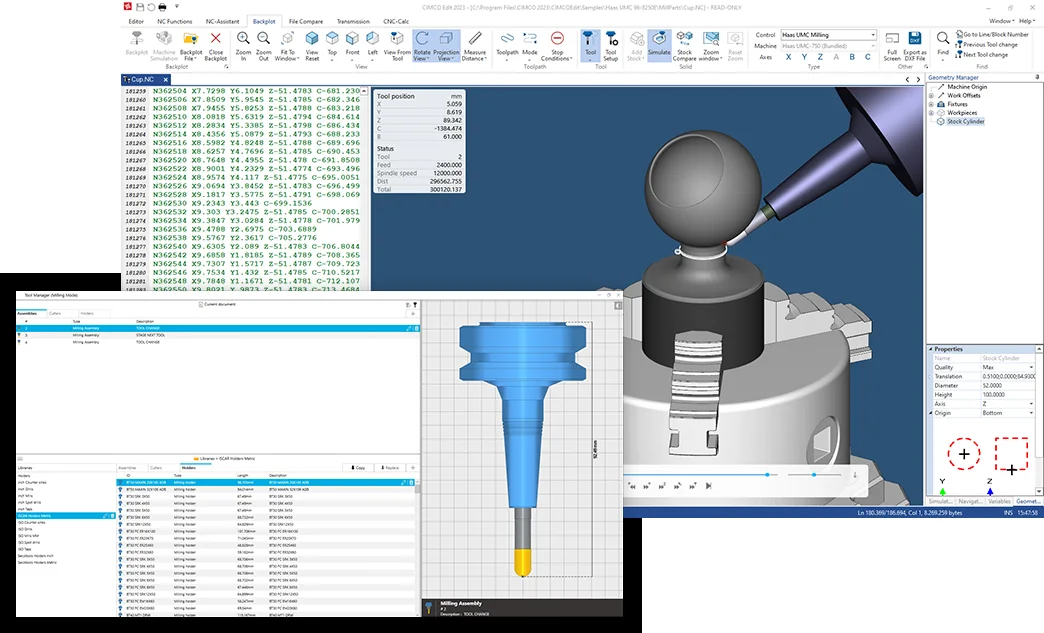
When a CNC program is revised, the critical question is what those edits mean for tool motion. An editor that keeps the NC text connected to the toolpath makes reviewing changes more practical.
From code to visible tool motion
CIMCO Edit brings NC code manipulation together with toolpath Backplot. This gives programmers a visual way to inspect movement while they review the program, rather than relying only on line-by-line text reading.
The Core and Ultra product tiers address different levels of NC editing, visualisation and verification. Not every verification capability is available in every licence or configuration.
Where simulation adds value
Simulation can assist in checking what a programmed move will do to the workpiece, finding suspicious motion and reviewing modifications before an operator uses machine time. The effectiveness of a check depends on the machine, tooling, stock and post-processor data used.
No desktop simulation removes the need for a controlled machine prove-out.
Next step: CIMCO Edit AI
CIMCO has introduced CIMCO Edit AI: an AI agent can connect to CIMCO Edit through an optional MCP server to help write and edit NC code, optimise toolpaths and troubleshoot programs. Verification and collision checking still run in CIMCO Edit's own simulation — not in the language model — so the review process described above stays in control.
Choosing the right CIMCO Edit setup
As the CIMCO reseller for Scotland and the UK, MGC Technical Service helps shops choose between CIMCO Edit Core, Ultra and Machine Simulation, set up the right controls and posts, and train programmers to review NC changes before they reach the machine.
Discuss a relevant engineering requirement: request a technical demonstration or quotation.