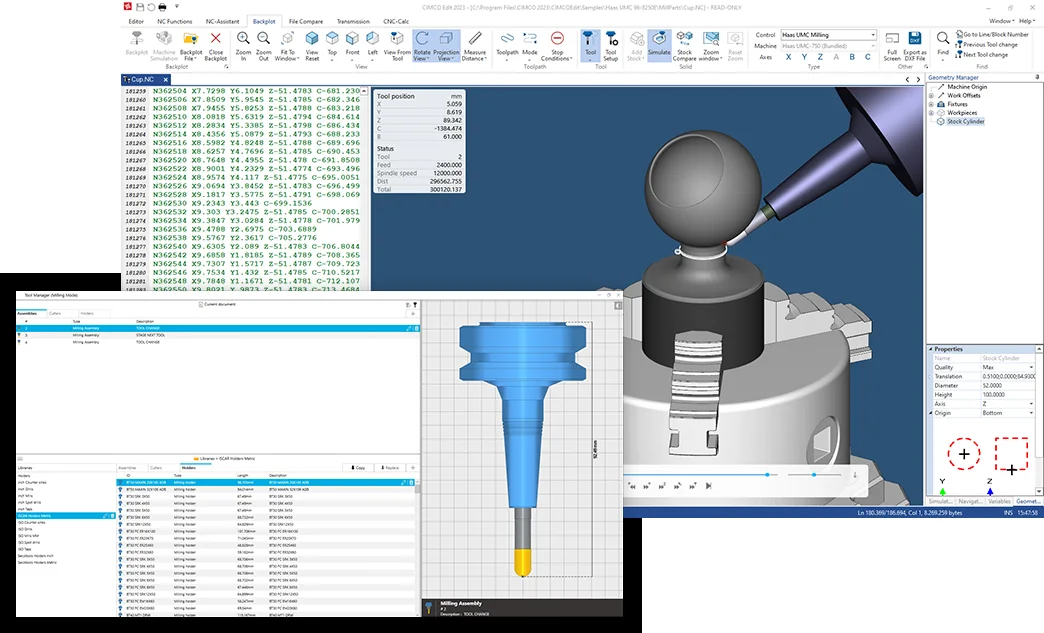
AI assistance is becoming part of established CNC programming environments. On 23 October 2026, CIMCO announced CIMCO Edit AI, an optional connection that brings a compatible AI agent into the existing editor and simulation workflow.
What changes for CNC programmers?
The agent can examine active NC files, explain unfamiliar code, propose or apply requested edits and help investigate inconsistencies between the simulated and expected machine behaviour. It can also initiate checks in CIMCO and explain their results. This is particularly useful when diagnosing an unfamiliar control configuration or inherited program.
AI assistance is not the verification engine
Collision and travel-limit checks are performed by CIMCO's own verification tools. The AI can initiate these checks and interpret the findings, but does not replace them. Recheck modified programs with the correct machine, tooling, stock and fixture configuration before release. The programmer remains responsible for approval.
Connecting an AI agent
The optional Model Context Protocol (MCP) connection supports compatible desktop agents, including Claude and Codex. CIMCO's announcement identifies Edit 2026 Ultra and the NC Machine Simulation add-on as availability routes; confirm the applicable version and licence before purchase. The user guide documents Help → Connect to AI Agents for Ultra.
Confidentiality and shop-floor control
Connected agents may send open program content, paths, machine settings and screenshots to their AI service. Use only approved agents and authorised engineering data. The documented connection cannot transfer programs to or from CNC machines. Review the agent's data-handling terms and your company's IP and security policies.
Where it fits in a manufacturing workflow
For MGC customers, this is an additional option for NC review and troubleshooting alongside established CAM, simulation and production processes. It does not imply that CIMCO Edit AI is integrated with MGC Matrix AI products.
Official CIMCO resources
CIMCO announcement — 23 October 2026
For assistance selecting the right edition, see our Core vs Ultra guide and CIMCO software solutions.